SMS and RCS messages
How people join Stylus by text, what Stylus sends, and how to stop.
- Program
- Stylus, by JC Media Arts, Inc.
- From
- [STYLUS NUMBER], or the Stylus chat on phones with RCS
- Messages
- Outfit looks, replies to requests, closet updates, account links and sign-in codes. No marketing.
- Frequency
- Message frequency varies: typically one look a day, plus replies.
- Cost
- Message and data rates may apply.
- Help
- Reply HELP, or email support@stylus.me.
- Stop
- Reply STOP at any time.
- Carriers
- Carriers are not liable for delayed or undelivered messages.
How someone joins
- An invitation email opens their own sign-up on stylus.me.
- They set up their closet and style in the web app.
- They enter their mobile number and tap Chat now. Their messaging app opens with JOIN and their code filled in.
- They press send. That text is their opt-in.
- Stylus replies to confirm, then texts again once their account is ready. Stylus never texts first.
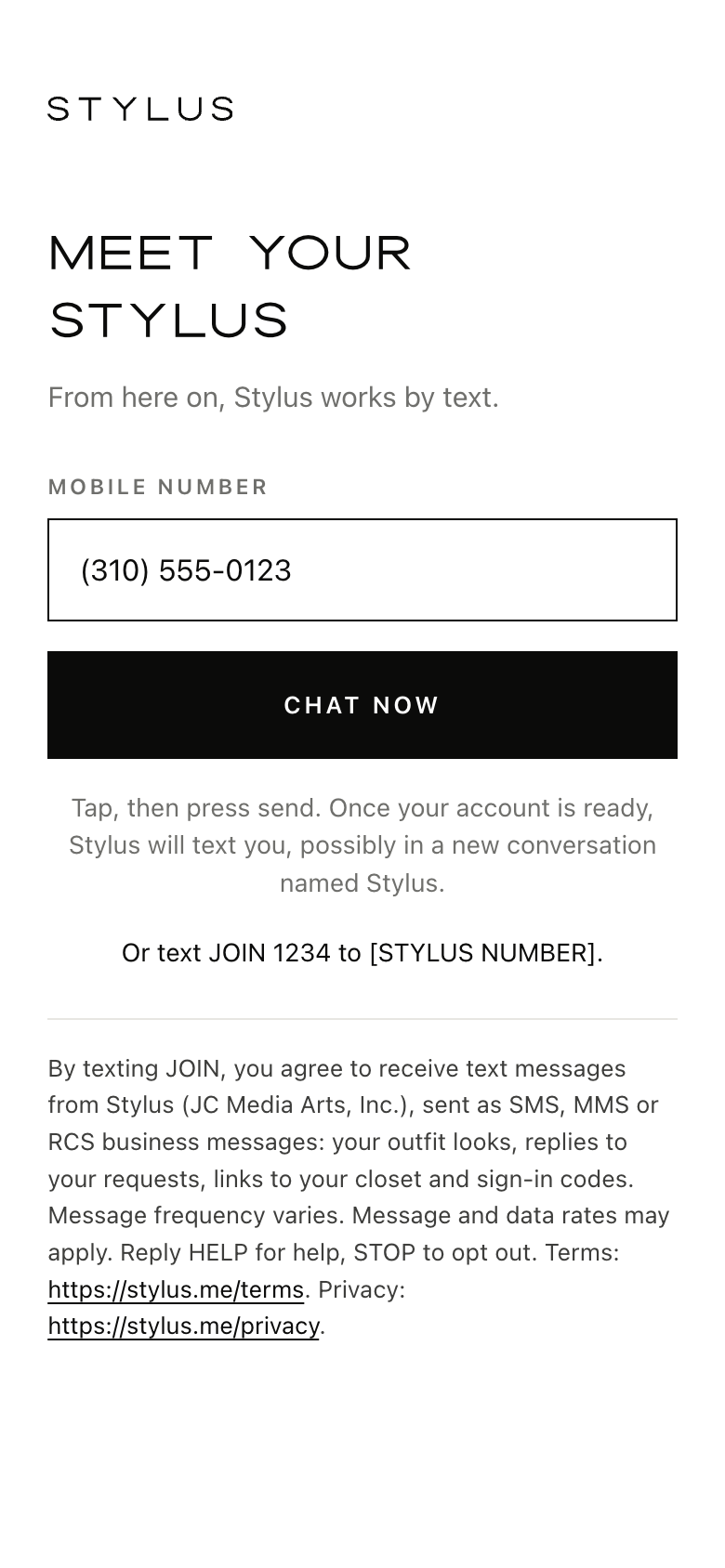
The join screen
Meet your Stylus
From here on, Stylus works by text.
Mobile number (310) 555-0123Tap, then press send. Once your account is ready, Stylus will text you, possibly in a new conversation named Stylus.
Or text JOIN 1234 to [STYLUS NUMBER].
The last paragraph is the consent wording, word for word. As a picture: join-screen.png
What Stylus sends
Every text starts "Stylus:". With RCS, numbered replies become buttons to tap.
- Daily look, with its picture Stylus: Good morning. Today's look: navy blazer, white shirt, tan loafers, and the trench for a 58 degree evening. Reply 1 Love it, 2 Swap something, 3 Not today.
- Link Stylus: Here is your closet, ready to open: https://stylus.me/l/7Kq2Mx. The link works for 24 hours. Reply HELP for help.
- Sign-in code Stylus: Your sign-in code is 482913. It expires in 10 minutes. If you did not ask for it, you can ignore this message.
- Closet update Stylus: I have added the camel cashmere sweater to your closet under Knitwear. If anything looks wrong, just say so. Reply STOP to opt out.
- Should I buy this Stylus: On the green trench you sent: it works with six things you own, the grey trousers among them. Reply 1 to see three looks with it.
Keyword replies
- JOIN Stylus: Welcome. Your looks and replies will come by text. Msg frequency varies. Msg & data rates may apply. Reply HELP for help, STOP to opt out.
- HELP or INFO Stylus: your stylist by text. For help, email support@stylus.me. To pause morning looks, text PAUSE. Reply STOP to end all texts. Msg & data rates may apply.
- STOP, STOPALL, UNSUBSCRIBE, CANCEL, END or QUIT Stylus: You are unsubscribed and will receive no more messages from Stylus, sign-in links included. Reply START to return.
- START Stylus: Welcome back. Your texts from Stylus are on again. Msg frequency varies. Msg & data rates may apply. Reply HELP for help, STOP to opt out.
STOP in either chat stops both. Plain words like "stop texting me" count too. PAUSE stops only the morning look.
Your number
Used only to run Stylus. Text messaging originator opt-in data and consent will not be shared with any third parties. Information will not be sold or shared with third parties for promotional or marketing purposes.
More in the Privacy policy and Terms.